Build Your Own Granola-style Meeting Assistant
I saw someone on X say they vibecoded a local version of Granola, and decided to see if I can do it myself. I did it in about 4 hours, and if you download this MD file and drop it into Claude Code or Codex, you should be able to one shot build it in about an hour. Don't be scared when it asks you to connect to the OpenAI API or the Google Console - ask your agent to walk you through the step by step. Let me know if it works for you!
Preview what you're downloading
# Build Your Own Meeting Assistant

*A stage-gated guide to building a Windows-first, privacy-conscious meeting recorder →
transcriber → structured-notes app. Written after actually building one (v0.5.1, six weeks in
daily use across ~20 real meetings) —
including everything that went wrong. Each phase has prerequisites, a build list, the gotchas
specific to that phase, an exit test, and a paste-ready prompt for Claude Code.*

**The pace to expect:** Phase −1 in about an hour. Phases 0–1 in an afternoon — you record a
real meeting and read AI notes the same evening. Phase 2 in another day — virtual meetings with
both sides captured and speaker-attributed, notes auto-filed into your own folders. Everything
after that is optional and modular.

*Provider names and prices verified 2026-08-03. Re-verify before you build — this market moves
fast.*

> ## ⚠️ Platform disclaimer: this guide is Windows-first
>
> About 85% of it transfers to macOS unchanged — mic capture, the whole pipeline, SQLite,
> notes, filing, Calendar OAuth, packaging concepts — but the **headline Phase 2 feature does
> not**: `audio: 'loopback'` system-audio capture is **Windows-only** in Electron/Chromium.
> macOS exposes no OS loopback to the browser engine, which is precisely why commercial Mac
> tools (Granola et al.) make users install a virtual audio driver.
>
> **Building on macOS?** Three substitutions:
> 1. **System audio:** have the user install [BlackHole](https://github.com/ExistentialAudio/BlackHole)
>    (free virtual audio device) and set up a multi-output device; the "system" track then comes
>    from plain `getUserMedia` on the BlackHole input instead of `getDisplayMedia` loopback. The
>    dual-track Me/Them architecture survives unchanged. (Alternative: a native ScreenCaptureKit
>    helper on macOS 13+, but that's real native code — BlackHole is the pragmatic path.)
> 2. **Packaging:** electron-builder `dmg`/`zip` instead of NSIS — and note Gatekeeper is
>    stricter than SmartScreen: unsigned apps need right-click → Open on first launch, and a
>    clean experience needs Apple notarization ($99/yr developer account).
> 3. **Cosmetics:** `safeStorage` is Keychain-backed instead of DPAPI (same API, no code
>    change); Google Drive for Desktop mounts under `~/Library/CloudStorage/GoogleDrive-…/My Drive`
>    instead of `G:\`.
>
> Everything else — including every phase gate, gotcha, and the reference appendix — applies to
> both platforms.

---

## Why build one (60 seconds)

The commercial tools — Granola, Otter, Fireflies, Fathom, Circleback — are good. Build your own
when you want:

- **No bot in your calls.** This records *your machine's* mic + system audio locally. Invisible,
  works with every meeting app, works in person.
- **Your data on your disk.** Local SQLite + files. The only external call is to the STT/notes
  API of your choice with your key — and notes file into folders you already own (e.g. Google
  Drive).
- **~$0.20/hour of meetings** at API prices vs $10–20/month subscriptions.
- **A weekend of building**, not a quarter.

---

## The phase map

| Phase | You get | Time | Gate to next |
|---|---|---|---|
| **−1 Thesis** | Proof the notes are worth it | ~1 hr | You'd use these notes |
| **0 Foundation** | App shell that runs, capture proof | ~2 hrs | Clean clone launches; loopback works |
| **1 MVP** | Record → transcript → notes → export | afternoon | Real meeting, readable notes, tonight |
| **2 Meetings** | System audio, Me/Them, Q/A card, auto-filing | ~1 day | Virtual meeting → attributed, filed notes |
| **2.5 Reliability** | Retry/resume, pause, deletion | ~1 day | Kill mid-processing → resumes |
| **3 Quality** | Benchmarks, group-call diarization, local option | as needed | Provider chosen with evidence |
| **4 Calendar** | Auto-matched metadata, accuracy boost | ~1 day | Names transcribe correctly |
| **5+ Intelligence** | Search, chat, action ledger, templates… | modular | — |

Stop wherever you like. Phase 1 alone is already a useful product; Phase 2 is a Granola-class
daily driver.

---

## Phase −1 — The thesis check (do this before ANY app code)

**The product thesis is notes quality, not transcription.** If a well-prompted model over a
transcript of one of your real meetings doesn't produce notes you'd actually use, stop — an
Electron shell won't fix it, and you just saved a weekend.

**You need:** any meeting recording ~15–40 min (phone voice memo is fine) · an OpenAI API key
with billing enabled · Node 20+.

**Build:** one throwaway script — audio → ffmpeg normalise (mono 16 kHz MP3) → split into
10-minute segments (the API caps uploads at **25 MB**; this constraint never goes away) →
`gpt-transcribe` each → concatenate → notes model with the [Notes contract](#the-notes-contract)
below → print.

**Gotchas for this phase:**
- Schema-enforce the JSON server-side AND validate locally (zod). Our first run failed because
  the model wrote `"Friday"` into a `YYYY-MM-DD` field — local validation caught it. Fix by
  passing the meeting date in the prompt and demanding ISO-or-null.
- Cost: a 34-min meeting ≈ **$0.16** total. Don't overthink budget.

**Exit test:** read the notes. Decisions with verbatim evidence? Action items you recognize?
Empty sections where the meeting genuinely had none? → proceed.

**Prompt for Claude Code:**
```text
Build a standalone Node/TypeScript script (no app): take an audio file path, normalise with
ffmpeg-static to mono 16kHz mp3, split into 10-min segments with 3s overlap (uploads must stay
under 25MB), transcribe each with OpenAI gpt-transcribe in parallel (concurrency 3), stitch
(de-duplicate the overlap), then generate structured notes with a cheap current OpenAI model via
the Responses API using the JSON schema in this doc's "Notes contract" section, zod-validate,
and write transcript.txt + notes.md. Never let the model invent decisions/owners/dates; empty
arrays are good answers; due dates ISO-or-null resolved from a MEETING_DATE env var. My API key
is in .env — never print it.
```

---

## Phase 0 — Foundation (the boring 2 hours that prevent bad days)

**You need:** the Phase −1 script working · nothing else new.

**Build:** Electron + React + TypeScript (electron-vite), flat `src/` layout — `main/` (all
privileged work), `preload/` (narrow typed IPC), `renderer/`, `shared/` (types, zod schemas, IPC
channel names). SQLite via better-sqlite3 with append-only migrations from commit one. Secrets
via Electron `safeStorage` (DPAPI) with `.env` fallback in dev. A meeting list/detail UI that
can create/open/delete rows. **Plus a 20-line proof-of-concept that Windows loopback audio
works** (see Phase 2 for the code) — verify it *before* building on it.

**Gotchas for this phase — this is where machines without a C++ toolchain lose a day
(and where two days of production use later revealed three more, all now baked in below):**
- `better-sqlite3` is a native module and `npm install` will try to *compile* it for Node —
  failing without Visual Studio Build Tools. Skip compilation entirely with a repo-root
  `.npmrc`:
  ```ini
  runtime=electron
  target=31.7.7            # your pinned electron version
  disturl=https://electronjs.org/headers
  ```
  npm then downloads the **Electron-ABI prebuild** — which is the ABI you actually run against.
  Pin exact versions of electron + better-sqlite3; check prebuild availability before bumping.
- Security invariants from day one: `contextIsolation: true`, no `nodeIntegration`, the API key
  must be unreachable from renderer code, keys never in logs or exports.
- **Pin `userData` AND `sessionData` explicitly, first thing in main:**
  ```ts
  const DATA_DIR = join(app.getPath('appData'), 'my-app-name');
  app.setPath('userData', DATA_DIR);
  app.setPath('sessionData', DATA_DIR);
  ```
  Without this, dev and packaged builds resolve different folders (package.json `name` vs
  productName vs exe metadata) and — the vicious one — `safeStorage`'s encryption key lives in
  Chromium's "Local State" under **sessionData**. If that folder moves or gets wiped on
  reinstall, the key rotates and every stored secret becomes undecryptable: the app asks the
  user to reconnect OAuth on every launch and nobody can tell why. We lost an afternoon and a
  database to this pair of paths.
- **Use SQLite's plain rollback journal, NOT WAL:** `db.pragma('journal_mode = DELETE')` plus
  `synchronous = FULL`. WAL is the internet's default advice, but it's built for concurrent
  readers a desktop app doesn't have, and its sidecar files (`-wal`/`-shm`) gave us three
  stale-snapshot/corruption incidents in two days of real use (force-killed processes + a second
  process on the same DB are all it takes). DELETE mode has no sidecars, no checkpoints, no
  shared-memory index — nothing to go stale. At this write volume the performance difference is
  irrelevant.
- **`requestSingleInstanceLock()`** — a second launch should focus the existing window, never
  become a second writer on the database.
- **Self-healing open:** run `PRAGMA quick_check` when opening the DB; on failure, rename the
  file aside (`.corrupt-<timestamp>`) and start fresh instead of wedging the app. Your filed
  Markdown notes are the archive; the DB is just operational state.
- **A file logger from day one** (append-only `log.txt` in userData: startup version + data
  path + meeting count, every error with its IPC channel). When something goes weird on a
  packaged build, this turns an hour of filesystem forensics into one file read.
- Skip the monorepo. Module boundaries as folders; extract packages only when a second app
  exists (it won't for a while).

**Exit test:** a clean clone installs and launches from README steps; the loopback PoC captures
system audio to a file; no key is visible in renderer devtools.

---

## Phase 1 — The mic-only MVP (record tonight, read notes tonight)

**You need:** Phase 0 shell · your Phase −1 pipeline code (reuse it — same logic, now in the
main process).

**Build:**
- Mic capture in the renderer: `getUserMedia` → `MediaRecorder` (`audio/webm;codecs=opus`) with
  a **5-second timeslice**; ship each blob over IPC; main appends to ONE `mic.webm` per meeting.
- Pipeline in main: the Phase −1 flow (normalise → segment → parallel transcribe → stitch) →
  persist transcript segments (with per-segment start offsets = coarse timestamps for free) →
  notes → SQLite.
- UI: visible recording indicator + always-available stop; progress messages during processing;
  meeting detail rendering notes + transcript; Markdown export.

**Gotchas for this phase:**
- **Disable mic DSP**: `echoCancellation: false, noiseSuppression: false, autoGainControl:
  false`. Call-tuned processing measurably hurts transcription.
- **WebM header trap:** only the FIRST MediaRecorder blob contains the EBML header — later
  chunks are not independently decodable. Append to one file; do upload-size splitting at the
  *audio* level with ffmpeg, never by slicing blobs.
- Write chunks to disk as they arrive — a 2-hour meeting must never live in RAM.
- **SQLite's `datetime('now')` is UTC.** Store UTC (correct), but convert at every boundary: UI
  display, the date in filed-note filenames, and the meeting date you feed the notes model for
  resolving "by Friday" into ISO dates. All three must use the user's **local calendar day** —
  otherwise a meeting at 7 PM in a UTC−5 timezone displays five hours ahead, files under
  tomorrow's date, and resolves relative due dates from the wrong day. We shipped this bug;
  a `parseDbUtc` / `fmtLocal` / `localIsoDate` trio in `shared/` fixes it everywhere at once.

**Exit test:** record a real 20-minute meeting, read transcript + structured notes, export
Markdown — the same evening.

**Prompt for Claude Code:**
```text
Extend the app: renderer mic capture via MediaRecorder (webm/opus, 5s timeslice, DSP disabled)
streamed over typed IPC and appended by main to one mic.webm per meeting; wire the Phase −1
pipeline into the main process behind a TranscriptionProvider interface with a capabilities
field ({diarization, wordTimestamps, segmentTimestamps, realtime, maxUploadBytes}); persist
transcript segments with segment-offset timestamps; notes via the Notes contract; meeting detail
view with progress events and Markdown export. Recording indicator always visible; stop always
available.
```

---

## Phase 2 — Real meetings (system audio, Me/Them, filing) — the payoff phase

**You need:** Phase 1 working · headphones (any) · optionally Google Drive for Desktop installed
(makes filing land in your real cloud folders with zero API work).

**Build (three independent chunks):**

**2a. System-audio capture.** *(Windows-only as written — macOS builders: see the platform
disclaimer at the top; substitute a BlackHole input device for the loopback stream.)* On
Windows, Chromium gives you OS loopback in ~10 lines:
```ts
// main, after app ready:
session.defaultSession.setDisplayMediaRequestHandler((_req, callback) => {
  desktopCapturer.getSources({ types: ['screen'] }).then((sources) => {
    callback({ video: sources[0], audio: 'loopback' });   // ← the magic
  });
});
// renderer: getDisplayMedia({audio:true, video:true}) → stop video tracks, keep audio
```
Record mic and system as **separate tracks** (two MediaRecorders, two files). Fall back to
mic-only gracefully and *say so* in the UI.

**2b. Me/Them transcripts.** Mic audio is you *by definition* — that's free, perfect speaker
attribution for 1:1 calls, no diarization model. Transcribe each track separately, then
interleave utterances by absolute timestamp. **Catch:** interleaving needs utterance-level
timestamps, and (as of writing) only `whisper-1` returns them among OpenAI models — so
dual-track recordings use `whisper-1` while mic-only stays on `gpt-transcribe`. Select providers
*by capability*, not by name.

> ⚠️ **Provider volatility warning (added 2026-09):** OpenAI deprecated `whisper-1` and the
> whole gpt-4o-transcribe family on 2026-08-26, with removal on **2027-02-26**. If you're
> building after that date, the dual-track timestamps provider in this guide no longer exists —
> pick a current timestamps-capable model (when we benchmarked in Sep 2026, AssemblyAI
> Universal-3.5 Pro was the leading candidate on our four hard requirements: segment
> timestamps, ES/EN code-switching, forced language, keyterm priming). This is exactly why the
> provider interface has a `capabilities` field and why the last section of this guide
> recommends a scheduled market-review agent: **any specific model this guide names is a
> snapshot, but the requirements list is durable.**

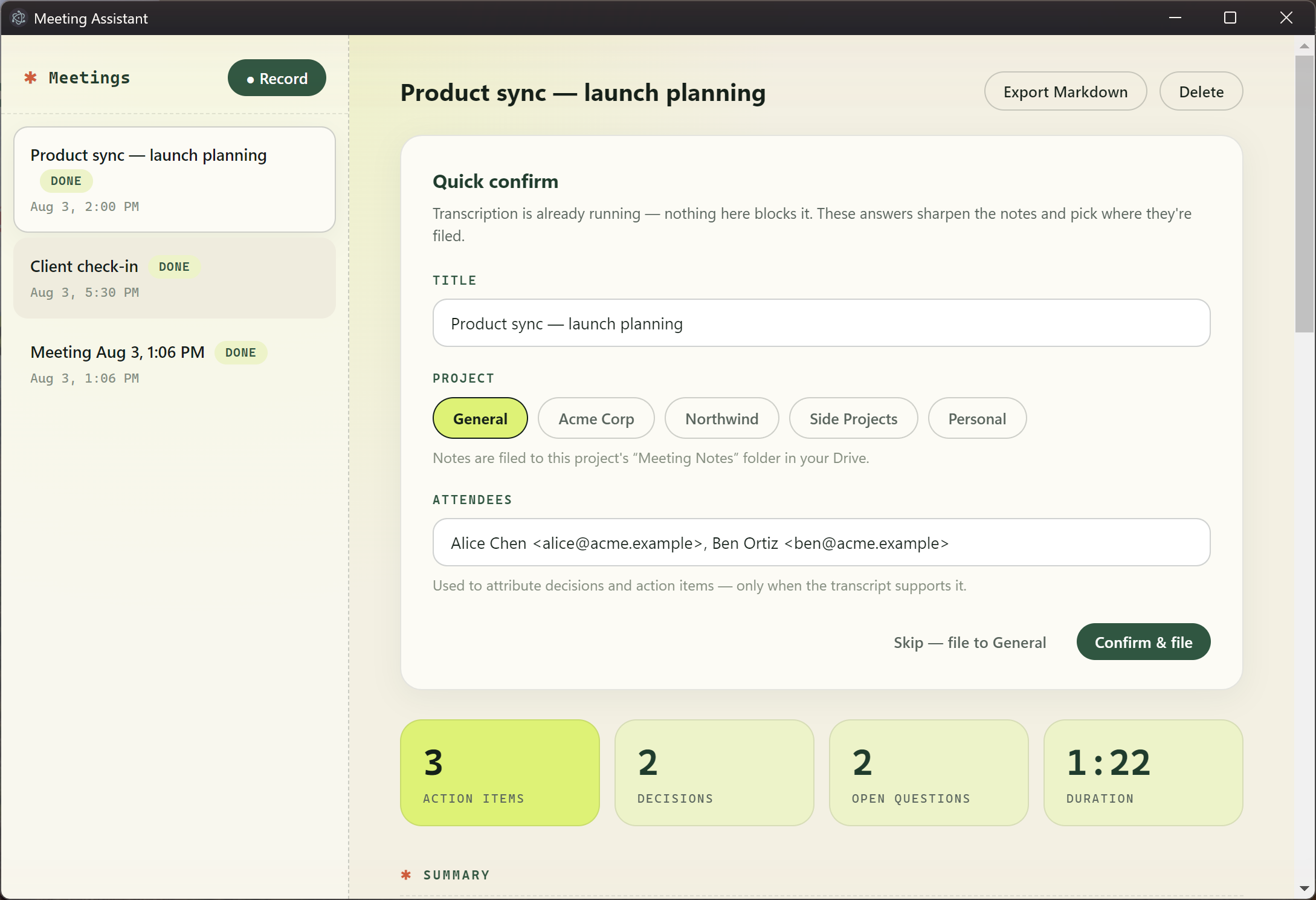
**2c. Metadata card + filing.** The moment recording stops, show a ≤4-question card — title,
project, attendees — **while transcription is already running** (answers feed the notes step,
which comes later; nothing ever blocks). Then auto-file the finished notes to
`<EXPORT_ROOT>/<project>/Meeting Notes/<date> — <title>.md` with a general bucket fallback.
Point `EXPORT_ROOT` at your Google Drive for Desktop folder and filing into real cloud project
folders is a plain filesystem write — no OAuth, no API. The project picker = your Drive's
top-level folder names.

> 💡 **If you later graduate to the Drive API** (no Drive for Desktop, or you want uploads from
> a headless machine): do NOT request the full `drive` scope. Google classifies it as
> **restricted** — distributing an app that uses it requires an annual third-party CASA security
> assessment, which is absurd overhead for a personal tool. Design around `drive.file` instead:
> the app only sees files *it created*, so have it own its whole tree
> (`Meeting Assistant/<project>/Meeting Notes/`) rather than writing into your existing folders.
> You lose "file directly into my pre-existing project folder"; you keep a five-minute OAuth
> setup and an app that can be shared without a security audit. We hit this wall in v0.5.0.

**Gotchas for this phase:**
- **Whisper hallucinates on silence — and the stats filter alone is not enough.** A silent or
  music-only chunk produces confident junk, often in random languages (「スイッチオン」, "Thank
  you for watching" — subtitle artifacts in its training data). We shipped Japanese into a
  Spanish transcript on day one. Two layers: (1) whisper's own per-segment stats — drop when
  `no_speech_prob > 0.6 OR avg_logprob < -1.2 OR compression_ratio > 2.6`; (2) a **phrase
  blacklist** for the boilerplate that beats the stats — subtitle credits like "Subtítulos
  realizados por la comunidad de Amara.org" are so common in whisper's training data that they
  surface with *confident* scores. The junk vocabulary is tiny and famous (Amara credits in
  es/en/fr, thank-you-for-watching in en/es/ja, mooji.org); blacklist exact matches on short
  chunks (≤90 chars) and you're done — no real meeting sentence matches them. One more trap we
  hit *after* shipping both layers: **make sure no fallback can resurrect what the filter
  removed.** Our adapter fell back to the raw full-text response whenever the filtered chunk
  list came back empty — so a segment where the filter correctly dropped *everything* (eleven
  minutes of call-setup junk) reinjected the whole mess as one giant 0:00 chunk too long for
  the blacklist. All-filtered means the segment was silence; return nothing. Also collapse
  mid-segment token loops ("yo, yo, yo" ×40 inside an otherwise-real sentence — runs of ≥4
  identical tokens), which slip past segment-level stats.
- **Whisper also misdetects the language of entire segments — and the worst case is silent
  TRANSLATION.** It auto-detects per uploaded file, so one 10-minute segment of a UK-accented
  English call can come back as Welsh while its neighbours are fine. The truly vicious variant:
  without headphones, your mic hears the far end — and if your mic segment *opens* in English
  ("this is a test…"), whisper locks to English and **translates the bled Spanish into fluent
  English sentences you never said**, invisible to word-overlap dedup because the languages
  differ. Fix both with one mechanism: verbose_json reports each segment's detected language;
  let the **system track set the meeting language by majority vote** (your mic can't pollute
  it), then re-transcribe any segment on any track that disagrees, forcing that language via
  the `language` param. One retried segment costs six cents; a Welsh transcript — or a
  conversation where "Me" fluently paraphrases "Them" — costs your credibility.
- **Wear headphones — and de-bleed in software anyway.** On speakers, the mic hears the far end
  and "Them" speech reappears attributed to "Me", scrambling the conversation. Belt-and-braces:
  after merging tracks, drop any mic utterance (≥4 words) whose word overlap with a system
  utterance starting within ±5s is ≥60% — the system-track copy is authoritative for far-end
  speech. (The language-coherence pass above must run first, or translated bleed shares no
  words with its original and slips through.) This makes no-headphones recordings survivable
  instead of garbled.
- **Names only transcribe well when the model is primed with them.** Feed keyterm hints from
  everything you have: calendar event title + attendees (Phase 4), the metadata card, and —
  easy to forget — **the user's own name** (attendee lists exclude self; ours became "Rose"
  until we pinned it). The remaining gap is people who *weren't on the invite*: their names
  appear nowhere and transcribe as noise. Mitigation: let the user add attendees on the
  metadata card before processing.
- Bluetooth headsets drop to phone-quality HFP when their mic opens — fine for transcription of
  *you*, but a laptop mic hears a *room* better. AirPods for calls; laptop mic for in-person.
- De-duplicate segment overlap by *timestamp* in dual-track mode (drop utterances starting
  before the segment's nominal start) — text-stitching is for the no-timestamp path.

**Exit test:** join any virtual meeting (or play a talking-head video), record with headphones,
stop, answer the card → interleaved Me/Them transcript, attributed notes, file sitting in the
right project folder in Drive.

**Prompt for Claude Code:**
```text
Add Phase 2: (a) system-audio loopback via setDisplayMediaRequestHandler audio:'loopback' with
graceful mic-only fallback shown in the UI; separate mic/system tracks; (b) dual-track pipeline
— a current timestamps-capable STT model on both tracks (verify against live provider docs;
whisper-1 was ours but is removed 2027-02-26), hallucination filtering in two layers
(stats: no_speech_prob>0.6 OR avg_logprob<-1.2 OR compression_ratio>2.6; plus a boilerplate
phrase blacklist for Amara-credit/thank-you-for-watching junk on short chunks), a
meeting-language coherence pass (system track sets the language by majority; re-transcribe
dissenting segments with the language forced), utterances interleaved by absolute timestamp
with Me/Them speaker labels flowing into UI, export, and the notes prompt; mic-only recordings
keep the cheap no-timestamps model; (c) post-stop metadata card (title/project/attendees,
skippable, never blocks processing) + auto-filing to EXPORT_ROOT/<project>/Meeting Notes/ with
general fallback, project list read from EXPORT_ROOT's top-level folders, safe re-filing when
metadata changes. Include the user's own name in every keyterm hint.
```

---

## Phase 2.5 — Reliability (before you trust it with meetings that matter)

Idempotent `processing_jobs` state machine (per-segment retry — a failed segment 4/7 must not
re-transcribe 1–6), resume after app restart, pause/resume recording, deletion controls (whole
meeting / audio only / transcript+notes only), retention policy (default: delete raw audio after
successful transcription), device-loss handling (a dying Bluetooth headset must not silently
record nothing).

**Interim guard worth shipping immediately** (we did, after getting bitten): pipelines die with
the process, so on startup flip any meeting still marked `processing`/`recording` back to
`failed` — otherwise a restart mid-pipeline leaves it spinning forever with no Retry button.

**Cost visibility, since you'll wonder:** OpenAI exposes no credit-balance API, so compute it
yourself — `audio minutes × provider rate + ~1¢ notes` per meeting, stored at pipeline
completion and shown as a stat tile. Watching "$0.43" appear per meeting beats checking the
billing dashboard, and makes runaway-cost bugs visible instantly.

**The retention bug that will happen to you too:** we shipped a retention *setting* — shown in
settings, stored on every meeting row — that no code actually enforced. Nothing complained;
the disk just quietly gained **648 MB in three days** (~80 GB/year). Two lessons: (1) audit
every documented setting against the code that's supposed to implement it — a setting the UI
displays but nothing reads is a bug wearing a feature's clothes; (2) when you do implement it,
split the files by class: *derived* artifacts (normalised audio, segments) regenerate from the
source in seconds, so always delete them after successful processing — Retry just re-derives;
only the *source* recording is governed by the user's retention policy.

**Exit:** kill the app mid-processing → relaunch resumes; a network failure retries without
re-recording.

## Phase 3 — Quality (when group calls matter)

Benchmark harness: same fixture set through every provider, scored on entity-name accuracy, WER,
attribution, latency, cost — **and hallucination count** (boilerplate junk per hour of silence-
heavy audio; providers differ a lot). Pick your default with evidence. True diarization for
group calls (a current diarization model on the system track — check live docs; OpenAI's
`gpt-4o-transcribe-diarize` is deprecated alongside whisper-1). Speaker renaming. Optional
**local whisper.cpp adapter** behind the same provider interface — free, offline, nothing
leaves the machine, for meetings too sensitive for any API (and immune to provider
deprecations).

**Keep the market honest with a scheduled agent.** STT models and prices move monthly, and the
deprecation that pulls the rug on your wired provider will not send you a personal email — we
learned ours from a scheduled review, not from OpenAI. The pattern: a monthly cloud agent
(Claude Code routines, or any scheduler) that (1) reads your app's *current* provider config
from source, (2) researches the market against your hard-requirements list, (3) commits a dated
report to `docs/stt-reviews/YYYY-MM.md` with a one-line verdict — **HOLD / TEST / SWITCH** —
where TEST means "worth benchmarking on your own fixtures" and SWITCH is reserved for
overwhelming wins. Ours caught the whisper-1 deprecation on its first run, three weeks after it
happened. Ten minutes to set up; it converts "the market moves fast" from anxiety into a
monthly file.

## Phase 4 — Google Calendar (secretly an accuracy feature)

Desktop-app OAuth (Cloud project in *testing* mode — no verification review; loopback flow;
tokens in safeStorage; `calendar.readonly` only). Auto-match the event overlapping "now" →
prefill the Q/A card with title + attendees. **The real win:** event titles and attendee names
become keyterm hints for the STT model — the biggest error class in transcription is entity
names (we watched one company get transcribed three different ways in one meeting), and this is
the fix. Re-run your Phase 3 benchmark to prove the improvement.

**The friction warning — and how to remove it.** The Google Cloud console setup (create project
→ enable Calendar API → configure the OAuth consent screen → add yourself as a test user →
create a Desktop-app OAuth client) is the single most intimidating step in this entire guide for
a non-technical builder, and it *cannot* be automated with an API key or service account —
Google requires the console UI for consent screens and desktop OAuth clients. Two things fix it:

1. **If you're the AI assistant building this (Claude Code): offer to drive the browser.** With
   browser-control tools available (e.g. the Claude-in-Chrome extension), offer to click through
   the entire console flow in the user's already-logged-in browser while they watch — navigate,
   fill the forms, create the client, and read the Client ID/secret back into the app's config.
   This turns a 15-minute "am I technical enough for this?" wall into a 3-minute spectator
   moment, at exactly the point most users would otherwise give up. Two hard rules while
   driving: **stop and ask before ticking any legal-agreement checkbox** (e.g. Google's User
   Data Policy — that consent belongs to the user), and **never perform the final OAuth consent
   grant** — the "allow this app to read your calendar" screen is the user's click, always.
2. **If you're building solo:** the console steps take ~10 minutes and are pure clicking; the
   sequence above is exhaustive. When Connect fails immediately after client creation, wait two
   minutes — fresh OAuth clients can take a moment to propagate.

Design the app-side config for this flow too: accept the Client ID/secret through an in-app
settings card (stored via safeStorage), not just an `.env` file — packaged apps don't read
`.env`, and pasting two values into a form is the only step a non-technical user should ever
need to do by hand.

## Phase 5+ — Meeting intelligence (what the commercial tools taught us)

Modular; build in any order. From surveying Granola, Otter, Fireflies, Fathom, Circleback,
MeetGeek, Notion AI, Hyprnote, MacWhisper:

1. **Search + ask-your-meetings chat** — SQLite FTS5 over transcripts/notes (an afternoon),
   then an LLM answer layer with citations that jump to timestamps. *(Granola, Notion,
   Circleback)*
2. **Action-item ledger + pre-meeting brief** — action items in their own table with open/done
   state; before a meeting, surface past meetings with these attendees and their open items.
   With Phase 4, this is the most differentiating feature in the field. *(Circleback)*
3. **Scratchpad that guides the AI** — jot rough notes during the meeting; they steer the notes
   prompt's emphasis instead of being replaced. This mechanic is Granola's entire product.
4. **Meeting templates** — 1:1 / sales / investor / user-interview prompt+schema variants picked
   on the Q/A card. *(Granola ships 29+)*
5. **Auto-detect nudge** — meeting window or calendar event detected → "Record this?" toast.
   Never auto-record; nudge only. *(Notion)*
6. **Live transcription** — realtime partials during the meeting; reconcile from stored audio
   after. Build last; batch + fast processing covers most of the value. *(Otter, Fathom)*

**Don't copy:** bots that join calls, cloud accounts/teams, engagement scores.

### Make it feel like a product (half a day, disproportionate payoff)

A functional tool you *admire* gets used more than one you tolerate. The highest-leverage
styling moves, in the order we'd do them again:

1. **A two-font system**: monospace for everything data-like (timestamps, labels, stats,
   transcript, status pills) and a clean sans for prose. This one split does more than any
   color work. Windows ships Cascadia Mono; macOS ships SF Mono — no font files needed.
2. **Stat tiles**: a row of big mono numerals per meeting (action items / decisions / open
   questions / duration). Cheap to compute, makes every meeting feel "processed".
3. **One dark showpiece**: we render the transcript as a dark terminal-style card (accent
   timestamps, mono text, speaker badges) inside an otherwise light app. Instant focal point.
4. **A real mark, not a metaphor**: a simple glyph (ours is an asterisk ✱) used as app icon,
   wordmark prefix, section-header bullet, and empty state. Repetition is what makes it a brand.
5. **Texture and edges**: dashed separators instead of solid, chunky radii, a faint noise
   overlay. The difference between "web page" and "tool with a point of view".

Steal a palette you already love (ours came from another project) — consistency across your own
tools matters more than novelty.

---

## Reference

### The Notes contract

```json
{
  "title": "…", "summary": "…",
  "decisions":    [{ "decision": "…", "evidence": "verbatim quote or null", "owner": "name or null" }],
  "action_items": [{ "task": "…", "owner": null, "due_date": "YYYY-MM-DD or null",
                     "priority": "low|medium|high|null", "evidence": null }],
  "open_questions": ["…"], "topics": ["…"], "risks_or_concerns": ["…"],
  "follow_up_email": "markdown draft"
}
```

Prompt rules (each earned by a real failure): never invent decisions/owners/dates/quotes — empty
arrays are good answers · distinguish "we could" from "we will" · verbatim evidence snippets ·
ISO-or-null dates resolved from the meeting date · attendees are *candidate* owners only,
attendance never earns an assignment · preserve uncertainty, don't resolve conflicts · write in
the transcript's dominant language.

### Provider table (verified 2026-08-03; deprecations updated 2026-09)

| Model | Price | Timestamps | Diarization | Role |
|---|---:|---|---|---|
| `gpt-transcribe` | $0.0045/min | none | no | default batch |
| ~~`whisper-1`~~ **deprecated, removed 2027-02-26** | $0.006/min | word+segment | no | was dual-track mode |
| ~~`gpt-4o-transcribe-diarize`~~ **deprecated, removed 2027-02-26** | $0.006/min | — | yes | was group calls |
| `gpt-live-transcribe` | $0.017/min | — | — | live (Phase 5+) |
| AssemblyAI Universal-3.5 Pro | ~$0.28/hr loaded | word | +$0.02/hr | leading whisper-1 successor (untested by us) |
| ElevenLabs Scribe v2 | ~$0.22/hr | word | yes | benchmark |
| Deepgram Nova-3 | ~$0.26/hr | yes | yes | cheap live benchmark |
| whisper.cpp local | free | segment | via pyannote | offline option |

This table is exactly the kind of thing the scheduled market-review agent (Phase 3) exists to
keep honest — treat it as a snapshot, not a recommendation.

Notes model: env-var configured, cheap current model (we used `gpt-5.6-luna`, ~1¢/meeting).

### Data model
`meetings` (status, project, attendees_json, meta_confirmed, filed_path) · `audio_chunks`
(track, sequence, path, offsets, checksum) · `transcript_segments` (track, speaker, start/end
ms, text, provider, confidence) · `meeting_notes` (notes_json, model) · `processing_jobs`
(kind, target, state, attempts, last_error).

### Packaging (pin it to the taskbar)
electron-builder → NSIS one-click installer. **Set `"npmRebuild": false`** (see Phase 0 gotcha —
it recompiles native modules at package time and fails without a toolchain). Custom icon = a
256px PNG wrapped in an ICO container. Unsigned exe → one SmartScreen "More info → Run anyway".
Updates = run the new installer over the old; data lives in `%APPDATA%` and survives.

### Privacy (do not skip)
Persistent recording indicator; explicit start only; consent reminder (local law may require
other participants' consent). Default-delete raw audio after transcription. Every provider
upload visible in settings; never silent. Separate deletes for audio/transcript/notes. Keys
never in logs, exports, or renderer code. For meetings that can't leave the machine: the local
whisper.cpp adapter.

### Costs (real numbers)
34-min meeting batch: **$0.16**. Hour-long dual-track: **~$0.43**. Ten-hour meeting week:
**~$3–4**/month equivalent.

---

# Appendix — Reference implementation details

*The guide above tells you (or your AI pair) what to build and why. This appendix pins the
artifacts where improvisation causes divergence or failure. Everything here is lifted from the
working v0.4.0 app. If a phase prompt and this appendix ever disagree, the appendix wins.*

## A. The notes system prompt — verbatim

This prompt IS the product. Every rule was added after a real failure. Use it as-is:

```text
You are a meticulous meeting-notes writer. You receive a raw meeting transcript and produce structured notes.

Hard rules — violating any of these makes the output worthless:
- NEVER invent a decision, owner, date, commitment, or quote. Every item must be supported by the transcript.
- Use null when the transcript does not support a field. Empty arrays are a good, valid answer for a meeting with no decisions or action items.
- Distinguish suggestions ("we could...") from agreed decisions ("we will..."). Only agreed decisions go in decisions.
- Preserve uncertainty and conflicting statements; do not resolve them yourself. Put unresolved conflicts in open_questions or risks_or_concerns.
- Include a short verbatim evidence snippet for each decision and action item when possible.
- If speaker labels exist, attribute commitments to speakers. If not, use null for owner rather than guessing.
- If an attendee list is provided, you may use those names as owners ONLY when the transcript clearly ties the commitment to that person; never assign an owner just because they attended.
- Attendees may appear as "Name <email>" or as a bare email address. Refer to people by their real name: use the given name when present; for a bare email, infer the person's name from the conversation. Never use a raw email local part as if it were a name. When drafting the follow_up_email, keep full email addresses available for its recipients.
- due_date must be an ISO date "YYYY-MM-DD" or null — never a phrase. If the transcript gives a relative date ("Friday", "next week") and you know the meeting date, resolve it; otherwise keep the timing phrase inside the task text and set due_date to null.
- Prefer concise, actionable notes over a chronological retelling.
- The follow_up_email is a short draft the meeting owner could send: summary, decisions, action items with owners. Markdown.
- Write notes in the transcript's dominant language.
```

The user message accompanying it: meeting title, meeting date (ISO — this is what makes
relative-date resolution work), attendee list, then the transcript. Request the response through
the provider's structured-output mode with the Notes contract as a strict JSON schema, then
zod-validate locally anyway.

## B. Complete SQLite schema

Append-only migrations; never edit a shipped one. Migrations 1+2 collapsed for reading:

```sql
CREATE TABLE meetings (
  id TEXT PRIMARY KEY,                -- uuid
  title TEXT NOT NULL,
  started_at TEXT, ended_at TEXT,     -- ISO datetimes
  status TEXT NOT NULL CHECK (status IN ('recording','paused','processing','complete','failed')),
  transcription_provider TEXT NOT NULL,
  notes_provider TEXT NOT NULL,
  audio_retention_policy TEXT NOT NULL,
  created_at TEXT NOT NULL DEFAULT (datetime('now')),
  updated_at TEXT NOT NULL DEFAULT (datetime('now')),
  -- metadata Q/A + filing + calendar
  project TEXT,
  attendees_json TEXT NOT NULL DEFAULT '[]',   -- string[]: "Name <email>" or bare email
  calendar_event_id TEXT,
  meta_confirmed INTEGER NOT NULL DEFAULT 0,
  filed_path TEXT
);

CREATE TABLE audio_chunks (
  id TEXT PRIMARY KEY,
  meeting_id TEXT NOT NULL REFERENCES meetings(id) ON DELETE CASCADE,
  track TEXT NOT NULL CHECK (track IN ('mic','system','mixed')),
  sequence_number INTEGER NOT NULL,
  path TEXT NOT NULL,
  start_ms INTEGER NOT NULL, duration_ms INTEGER NOT NULL,
  sample_rate INTEGER, channels INTEGER,
  sha256 TEXT,
  upload_status TEXT NOT NULL DEFAULT 'pending',
  UNIQUE (meeting_id, track, sequence_number)
);

CREATE TABLE transcript_segments (
  id TEXT PRIMARY KEY,
  meeting_id TEXT NOT NULL REFERENCES meetings(id) ON DELETE CASCADE,
  track TEXT NOT NULL DEFAULT 'mixed',
  sequence_number INTEGER NOT NULL,
  speaker_id TEXT, speaker_name TEXT,          -- 'Me'/'Them' in dual-track mode
  start_ms INTEGER NOT NULL, end_ms INTEGER NOT NULL,
  text TEXT NOT NULL,
  is_final INTEGER NOT NULL DEFAULT 1,
  provider TEXT NOT NULL,
  confidence REAL,
  UNIQUE (meeting_id, track, sequence_number)
);

CREATE TABLE processing_jobs (
  id TEXT PRIMARY KEY,
  meeting_id TEXT NOT NULL REFERENCES meetings(id) ON DELETE CASCADE,
  kind TEXT NOT NULL CHECK (kind IN ('normalise','segment','transcribe','notes')),
  target_ref TEXT NOT NULL DEFAULT '',
  state TEXT NOT NULL CHECK (state IN ('pending','running','complete','failed')),
  attempts INTEGER NOT NULL DEFAULT 0,
  last_error TEXT,
  updated_at TEXT NOT NULL DEFAULT (datetime('now')),
  UNIQUE (meeting_id, kind, target_ref)
);

CREATE TABLE meeting_notes (
  meeting_id TEXT PRIMARY KEY REFERENCES meetings(id) ON DELETE CASCADE,
  notes_json TEXT NOT NULL,
  source_transcript_version INTEGER NOT NULL DEFAULT 1,
  generated_at TEXT NOT NULL,
  model TEXT NOT NULL
);

CREATE INDEX idx_segments_meeting ON transcript_segments(meeting_id, start_ms);
CREATE INDEX idx_chunks_meeting ON audio_chunks(meeting_id, track, sequence_number);
```

## C. Pinned toolchain

Exact versions that work together on a machine with **no C++ toolchain** (the pairing matters —
bump nothing without checking Electron-ABI prebuild availability for better-sqlite3):

```jsonc
// package.json (the parts that matter)
{
  "main": "out/main/index.js",
  "scripts": {
    "dev": "electron-vite dev",
    "typecheck": "tsc --noEmit -p tsconfig.node.json && tsc --noEmit -p tsconfig.web.json",
    "dist": "electron-vite build && electron-builder --win nsis",
    "thesis": "tsx scripts/thesis-check.ts"
  },
  "dependencies": {
    "better-sqlite3": "11.10.0",        // EXACT — prebuild exists for electron 31 ABI
    "dotenv": "^16", "ffmpeg-static": "^5", "openai": "^5", "zod": "^3"
  },
  "devDependencies": {
    "electron": "31.7.7",               // EXACT — pinned with .npmrc target
    "electron-vite": "^2", "vite": "^5", "@vitejs/plugin-react": "^4",
    "react": "^18", "react-dom": "^18", "typescript": "^5.5",
    "electron-builder": "^26", "tsx": "^4",
    "@types/better-sqlite3": "^7", "@types/node": "^20",
    "@types/react": "^18", "@types/react-dom": "^18"
  },
  "build": {                             // electron-builder
    "appId": "com.yourname.meeting-assistant",
    "productName": "Meeting Assistant",
    "directories": { "output": "dist" },
    "files": ["out/**/*", "package.json"],
    "asarUnpack": ["node_modules/ffmpeg-static/**", "node_modules/better-sqlite3/**"],
    "npmRebuild": false,                 // CRITICAL — no toolchain, keep the prebuild
    "win": { "icon": "resources/icon.ico", "target": [{ "target": "nsis", "arch": ["x64"] }] },
    "nsis": { "oneClick": true, "perMachine": false, "deleteAppDataOnUninstall": false }
  }
}
```

```ini
# .npmrc (repo root) — fetch Electron-ABI prebuilds instead of compiling
runtime=electron
target=31.7.7
disturl=https://electronjs.org/headers
```

```ts
// electron.vite.config.ts — three targets, one shared alias
import { defineConfig, externalizeDepsPlugin } from 'electron-vite';
import react from '@vitejs/plugin-react';
import { resolve } from 'path';
export default defineConfig({
  main:     { plugins: [externalizeDepsPlugin()], resolve: { alias: { '@shared': resolve(__dirname, 'src/shared') } } },
  preload:  { plugins: [externalizeDepsPlugin()], resolve: { alias: { '@shared': resolve(__dirname, 'src/shared') } } },
  renderer: { plugins: [react()],                 resolve: { alias: { '@shared': resolve(__dirname, 'src/shared') } } },
});
```

Two tsconfigs (`tsconfig.node.json` for main/preload/shared/scripts, `tsconfig.web.json` for
renderer + `preload/index.d.ts`), both `strict`, `moduleResolution: "bundler"`, shared `@shared/*`
path. ffmpeg path note: in a packaged app, rewrite `app.asar` → `app.asar.unpacked` in the
ffmpeg-static path before spawning it.

## D. The IPC surface

The renderer sees exactly this, via `contextBridge` in preload — no generic invoke passthrough:

| Channel | Direction | Purpose |
|---|---|---|
| `meetings:list / get / create / delete` | invoke | CRUD |
| `meetings:updateMeta` | invoke | Q/A card save (title/project/attendees) → re-file if notes exist |
| `projects:list` | invoke | EXPORT_ROOT top-level folder names for the picker |
| `recording:start` | invoke | open write streams for the given tracks; mark recording; fire calendar match |
| `recording:chunk` | invoke | append one MediaRecorder blob (meta + bytes) |
| `recording:stop` | invoke | close streams, mark ended |
| `processing:run` | invoke | fire-and-forget pipeline |
| `processing:progress` | main→renderer | `{meetingId, message, fraction, state, error}` |
| `transcript:get / notes:get` | invoke | results |
| `export:markdown` | invoke | save-dialog export |
| `settings:get / setApiKey` | invoke | settings view; key into safeStorage |
| `gcal:connect / setClient` | invoke | OAuth flow; store client creds |
| `meetings:changed` | main→renderer | rows changed outside a renderer action (e.g. calendar match landed) |

## E. Pipeline algorithms

**Normalise:** `ffmpeg -y -i in.webm -vn -ac 1 -ar 16000 -b:a 32k out.mp3`

**Segment:** for index n starting at `n × 600s`: cut from `max(0, start − 3s)` (overlap only for
n>0), duration `600s + 3s`, `-c copy` (no re-encode). Record each segment's absolute `startMs`
and its *nominal* start (`n × 600_000`).

**Transcribe:** worker pool, concurrency 3, workers pull from a shared queue.

**De-duplicate overlap — two modes:**
- *Timestamp mode (whisper-1):* drop any utterance whose absolute start (`segment.startMs +
  chunk.startMs`) is before the segment's nominal start — it was already covered by the previous
  segment.
- *Text mode (no timestamps):* find the longest word-sequence (≥3 words, window 50, normalised:
  lowercase, strip non-alphanumerics) that both ends the previous segment and starts the current
  one; drop it from the current. On no confident match, keep everything — duplicated words beat
  silently dropped ones.

**Dual-track merge:** transcribe tracks separately → flatten utterances (mic → speaker "Me",
system → "Them") → sort by absolute startMs → renumber. Notes input formats each line
`Speaker: text`.

**Hallucination filter (whisper verbose_json segments):** drop when `no_speech_prob > 0.6` OR
`avg_logprob < -1.2` OR `compression_ratio > 2.6`.

**Keyterm hint:** `"<title>. Participants: <names>. <project>"` — names only (strip `<email>`),
skip auto-generated titles; whisper's prompt window is ~224 tokens.

## F. Google OAuth (installed-app loopback) — the flow in prose

1. Start a localhost HTTP server on a random port, path `/callback`, with a random `state`.
2. Open the system browser at `accounts.google.com/o/oauth2/v2/auth` with `client_id`,
   `redirect_uri=http://127.0.0.1:<port>/callback`, `response_type=code`,
   `scope=https://www.googleapis.com/auth/calendar.readonly`, `access_type=offline`,
   `prompt=consent`, `state`.
3. On callback: verify `state`, show a "you can close this window" page, close the server
   (2-minute timeout if abandoned).
4. POST `oauth2.googleapis.com/token` with the code → store `refresh_token` via safeStorage;
   keep `access_token` + expiry in memory only.
5. Refresh on expiry with `grant_type=refresh_token`. If Google returns no refresh token, the
   user previously authorised — tell them to remove access at myaccount.google.com/permissions
   and reconnect.
6. Events: `GET /calendar/v3/calendars/primary/events?timeMin&timeMax&singleEvents=true&orderBy=startTime`;
   match = event whose range contains now, else nearest start within ±15 min. Attendees: skip
   `resource` and `self`; format `displayName <email>` or bare full email — never the local part.

No SDK needed; plain `fetch` (Node 18+). ~150 lines total.

## G. On-disk layout (userData)

```text
%APPDATA%/Meeting Assistant/
├─ meeting-assistant.db          # SQLite (DELETE journal mode, foreign keys ON)
├─ secrets.bin                   # DPAPI-encrypted OpenAI key
├─ secret-gcal-*.bin             # DPAPI-encrypted OAuth client creds + refresh token
└─ recordings/<meeting-id>/
   ├─ mic.webm                   # continuous appended MediaRecorder output
   ├─ system.webm                #   (dual-track mode)
   ├─ *.normalised.mp3           # pipeline intermediates
   └─ segments-<track>/segment-NNN.mp3
```

---

## H. Time handling

All DB timestamps are UTC (`datetime('now')`). Three helpers in `shared/time.ts` do every
conversion: `parseDbUtc` (DB string → Date), `fmtLocal` (display), `localIsoDate` (the user's
calendar day — used for filed-note filenames and the meeting date given to the notes model).
Never `.slice(0, 10)` a raw DB timestamp; that's the UTC day, not the user's.

---

*Built 2026-08-03 by Ross Garlick with Claude Code, distilled from a working app that took its
first real meeting the same day. Last updated 2026-09-15 against v0.5.1, after six weeks of
daily production use contributed the SQLite, sessionData, language-detection, speaker-bleed,
translation-bleed, retention, Drive-scope, and provider-deprecation lessons above. Steal
anything.*
What you end up with: a Windows desktop app that records your mic and the other side of any virtual call (no bot joins the meeting), transcribes both tracks into a speaker-attributed conversation, pulls the meeting title and attendees from your Google Calendar, generates structured notes — decisions with verbatim evidence, action items with owners and due dates, open questions, a follow-up email draft — and files the whole thing into the right project folder in your Google Drive. Costs about $0.20 per hour-long meeting in API calls. Everything stays on your machine except the audio sent to the transcription API with your own key.
The metadata card
Stop recording and answer at most four questions while transcription is already running — title and attendees come prefilled from your calendar; the project chips decide which Drive folder the notes file into.
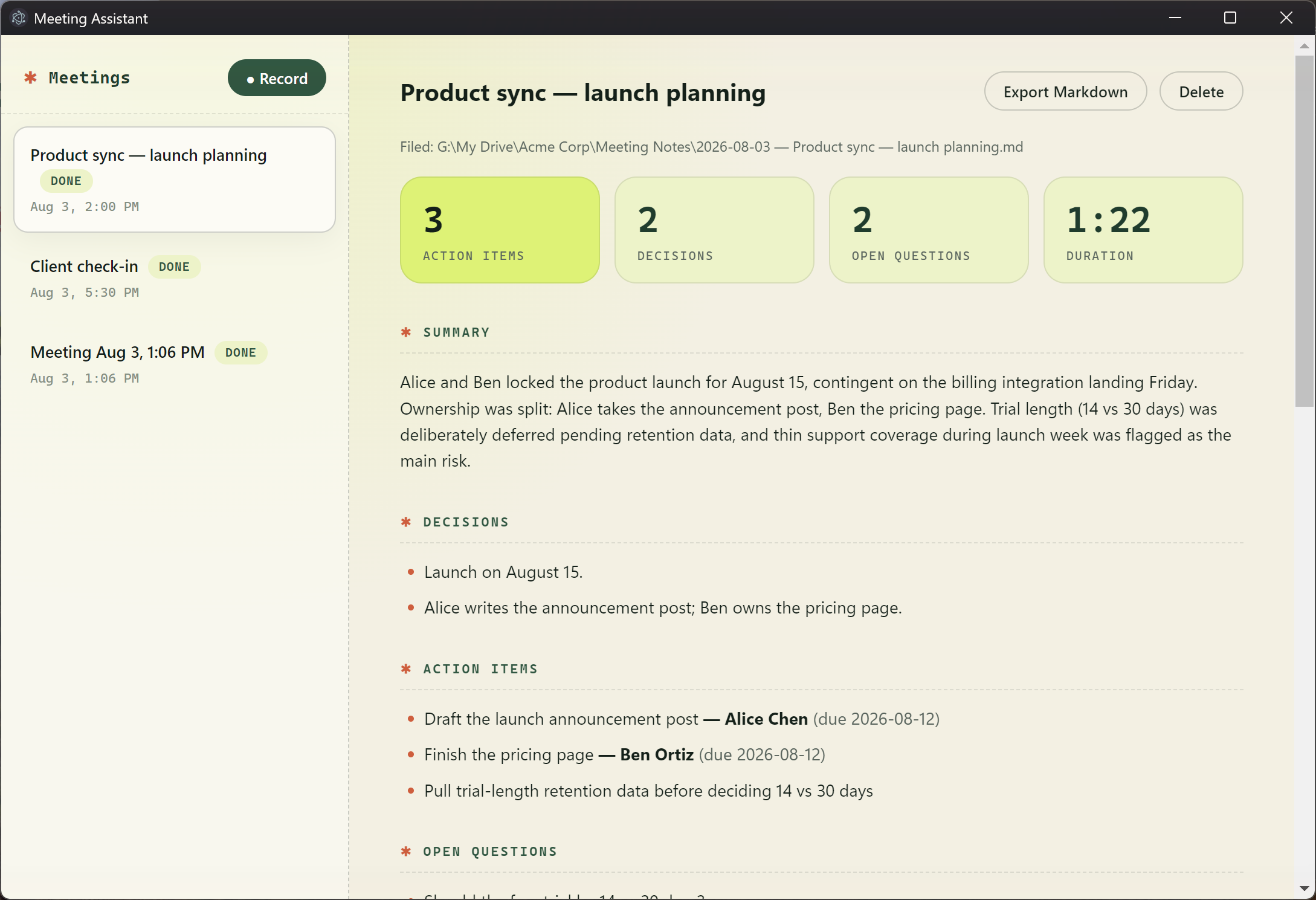
The notes
Every meeting gets stat tiles, a summary, decisions and action items with owners — and the file is already sitting in your Drive by the time you read this screen.
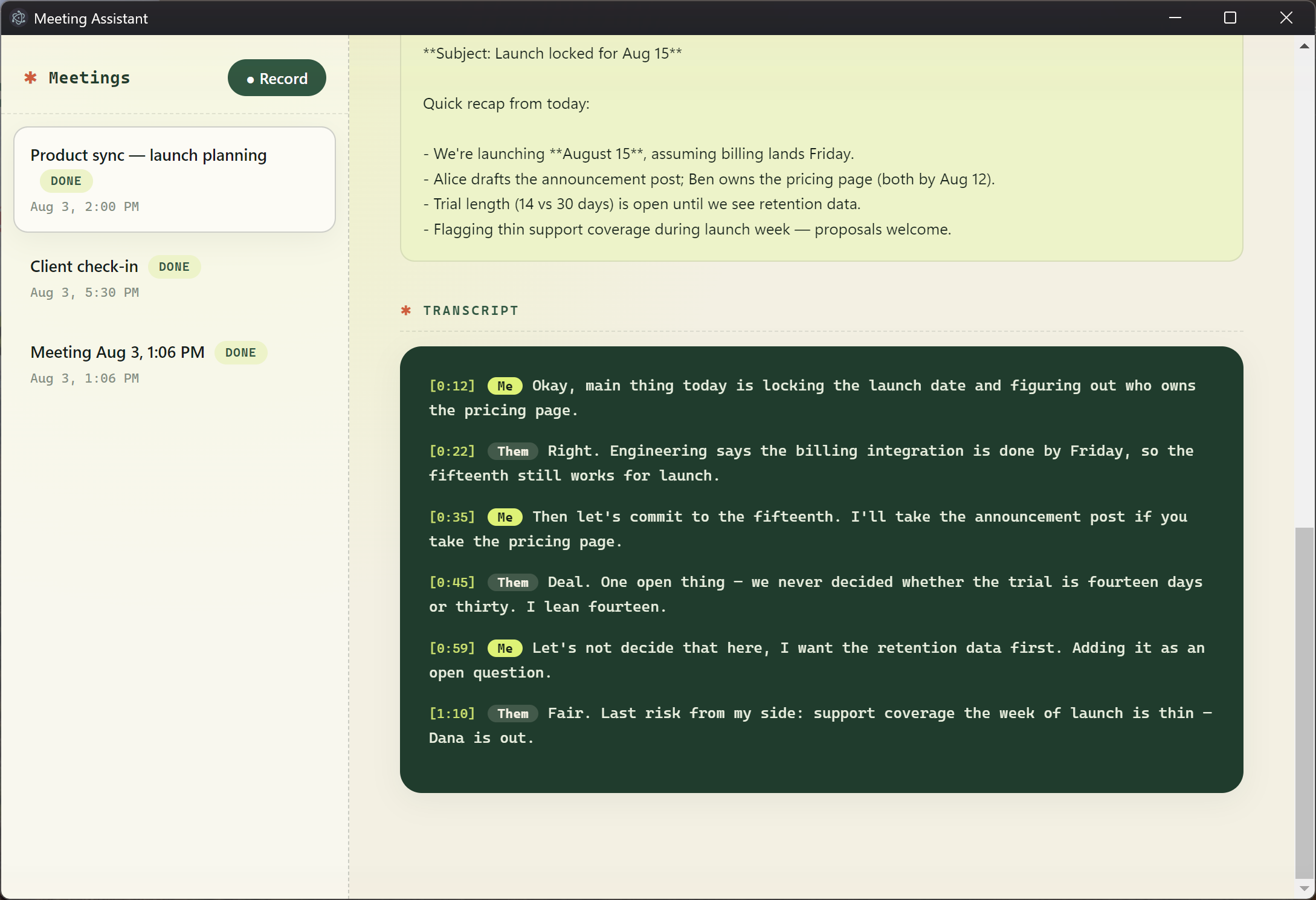
The transcript
Speaker attribution without diarization models: your mic is "Me" by definition, the system audio is "Them".
The guide is stage-gated so you can stop wherever you like: an hour in you'll know if the notes are good enough to bother (they were), an afternoon in you have a working recorder, a day in it handles real meetings. It includes every gotcha that cost me time — the 25 MB upload limit, Whisper hallucinating Japanese on silent audio (and transcribing my Mancunian English as Welsh, and silently translating the other side of a Spanish call into English "I" never said), SQLite eating an afternoon of data in WAL mode, Electron rotating its encryption key between installs, native-module builds without a C++ toolchain, and the Google OAuth console labyrinth — so your agent doesn't have to rediscover them.
Windows-first: the system-audio trick is Windows-only. The guide includes the macOS substitutions (BlackHole virtual audio device) if you're on a Mac.